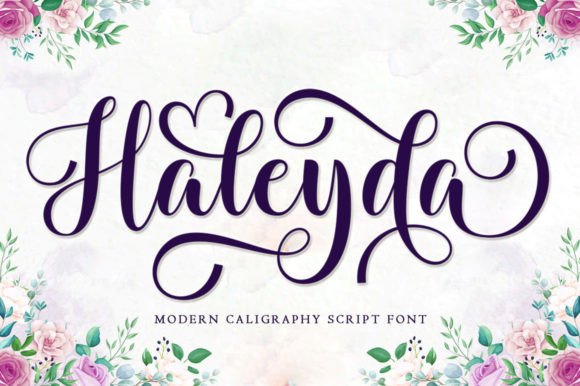
Haleyda: A Flowing Font for Creative Web Design
As a web designer, I’m always on the lookout for fonts that bring both personality and professionalism to a site. Haleyda has quickly become one of my go-to choices for headers and decorative elements. Its flowing, handwritten style adds an elegant touch that feels both modern and timeless.
A Font That Breathes Life Into Digital Spaces
Testing Haleyda in a hero section of a boutique online store was a revelation. The font’s soft curves and subtle swashes gave the page a sense of movement that felt natural and inviting. It worked especially well over a background image of a handcrafted product, adding visual interest without overwhelming the design.
On mobile screens, Haleyda maintained its clarity and charm. I was impressed by how it scaled down without losing its character. Whether used in a bold headline or as a subheading, it struck the right balance between readability and aesthetic appeal.
Perfect for Branding and Visual Hierarchy
Haleyda shines when used as a display font for headlines, call-to-action buttons, or logo text. In a coaching website project, I paired it with a clean sans serif for body copy. The contrast made the content easy to read while keeping the design fresh and engaging.
For a creative portfolio site, I used Haleyda in the navigation bar and section titles. It added a personal, artisanal feel that aligned perfectly with the brand’s identity. The font’s elegance helped convey a sense of craftsmanship and attention to detail.
Responsive Design and Accessibility Considerations
When testing Haleyda on different screen sizes, I found it performed well across desktop and mobile. However, I noticed that on smaller screens, some of the finer details in the letterforms could get lost. For this reason, I recommend using it for short phrases rather than long blocks of text.
Accessibility is always a concern, especially for users with visual impairments. While Haleyda is beautiful, it may not be the best choice for small text or form labels. Instead, I suggest reserving it for high-impact areas where its visual appeal can make the biggest difference.
Pairing Haleyda With Other Fonts
Font pairing is key to creating a cohesive digital experience. I’ve found that Haleyda pairs exceptionally well with simple, modern sans serifs like Montserrat or Open Sans. This combination keeps the design clean while allowing the script font to stand out where it matters most.
For a more editorial look, I’ve also experimented with pairing Haleyda with a serif font like Lora. The result was a sophisticated, layered design that felt both professional and approachable. These pairings work best in content-heavy sites where the font can add visual interest without competing with the text.
Real-World Web Use Cases
In a recent project for a digital course platform, I used Haleyda in the hero section and landing page headings. The font brought a sense of warmth and creativity that matched the course’s theme. It also helped differentiate the site from competitors who relied on more generic typefaces.
Another example was a campaign landing page for a seasonal product. Haleyda was used in the main title and supporting text, creating a cohesive look that felt both festive and professional. The font’s flowing nature complemented the imagery and helped guide the user’s eye through the page.
What to Look for Before Using Haleyda
Before integrating Haleyda into a project, I always check the available styles, weights, and file formats. It’s important to ensure that the font supports the needs of the design—whether that’s a single weight for a minimalist layout or multiple styles for a more dynamic look.
Additionally, I verify that the font includes proper licensing for commercial use, especially if it’s being used on a client’s website or in a digital product. Haleyda’s licensing terms are clear and straightforward, making it a reliable choice for web designers and developers.
For those working with multilingual content, it’s worth checking if Haleyda supports the necessary characters. While it works well for English, I recommend confirming compatibility with other languages if needed.